Instructions for how to use IXL and guidelines for students.
Welcome to the English Learning program with Purple Ink. We believe that learning English is a gradual process. The more effort and time you put into it, the more you will benefit. Therefore, here are some guidelines for studying English using an English learning program supported by Purple Ink. Please take the time to review these details to maximize your learning experience.
The program you will be working with is called IXL, an AI-based English teaching platform that serves as a supplement for students from kindergarten to 12th grade in the US. IXL can assess your proficiency level and suggest skills that would most benefit your learning at any level. All the formats are multiple-choice, with built-in lessons from professional educators in the US. The goal is to make learning enjoyable and effective. From what we have learned, if you can complete the 5th grade in IXL, you should be able to comfortably read and understand a typical US newspaper. Once you complete the 12th grade, it’s equivalent to completing US high school. However, we’ve noticed that if you are working with easy questions, you can get bored and feel like you are wasting time. We also learned that if you’re getting difficult questions, you can feel discouraged. Therefore, the most effective way to learn with this program is to identify your correct English proficiency level and learn at least two new skills each week. As a result, we have developed this guideline to improve your chance of success as we journey together in learning English.
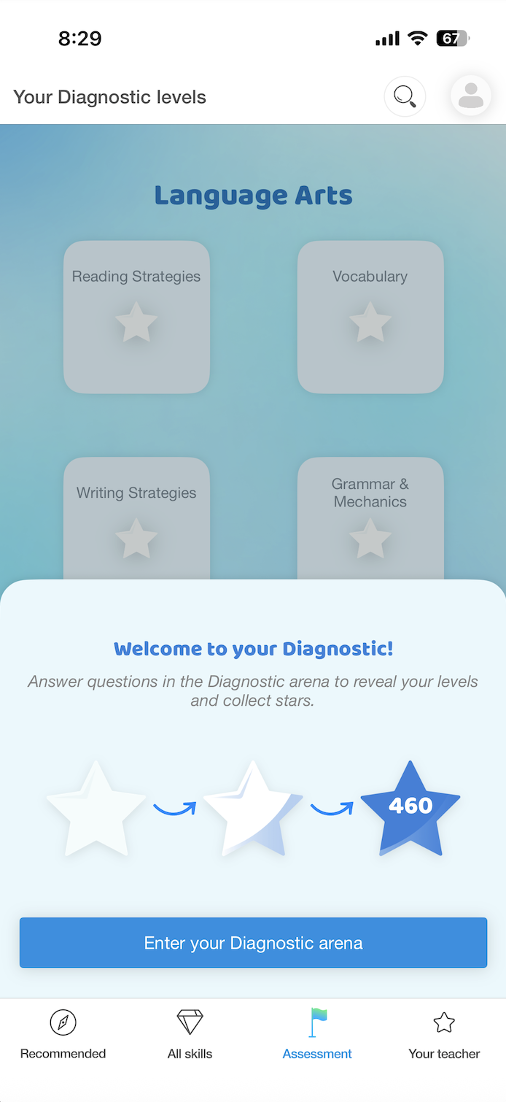
Once you have your username and password, the first thing you need to do is go to the Diagnostic Arena. If you use a computer, you can get there by clicking on the “Assessment” Tab at the top menu, then select “Step into the Arena”. If you are using a mobile device, like a phone or a tablet, then you can there by clicking on the “Assessment” Tab at the bottom menu, then select “Enter your diagnostic arena”. You will need to spend at least 45 minutes taking this test. Think of this as a placement test to determine your English proficiency level. If you don’t know the answer, it’s okay to choose “I don’t know this yet.” You’ll receive a score and recommendations for skills based on your performance. After that, the goal is to learn at least two skills from the recommendations generated by this activity. Recommendation is located in the first welcoming page on a computer, and locates on the first bottom tab on a mobile device.
When learning new skills, I recommend watching the short video from an expert educator first and trying to grasp the concept. It’s okay to watch the video multiple times until you’re familiar with the idea. After that, you can spend time answering the questions. The only way to make time count toward your learning is to answer these practice questions. To become proficient, you’ll need to get an 80 or higher score. Once you’re comfortable with a skill, move on to the next one. When you are more familiar with the platform, you can explores all available skills. There are also educational game appropriate for each grade level that help you retain your learning. Please keep in mind that playing game does not count toward learning time.
If you’re out of recommendations or feel the questions are too difficult or too easy, you can always revisit the Diagnostic Area to take more tests and better assess your level. I recommend doing the Diagnostic Area at least three times a year. However, the more often you spend time in the Area, the more accurate the program will be in determining your level and will give you better suggestions. In fact, this is the only way to see your progress on this platform because the area will give you a score at the end. Of note, time spent inside the Area does count toward your learning time.
Finally, each student who agrees to learning English through this platform must commit at least 60 minutes per week on studying, or about 10 minutes a day. Students will have three chances to miss this requirement. On your fourth miss, Purple Ink will take back your account and give it to another student who can make a better commitment. We do understand that there are extraordinary circumstances that can happen and are willing to make accommodation with appropriate notification to Purple Ink in a timely manner.
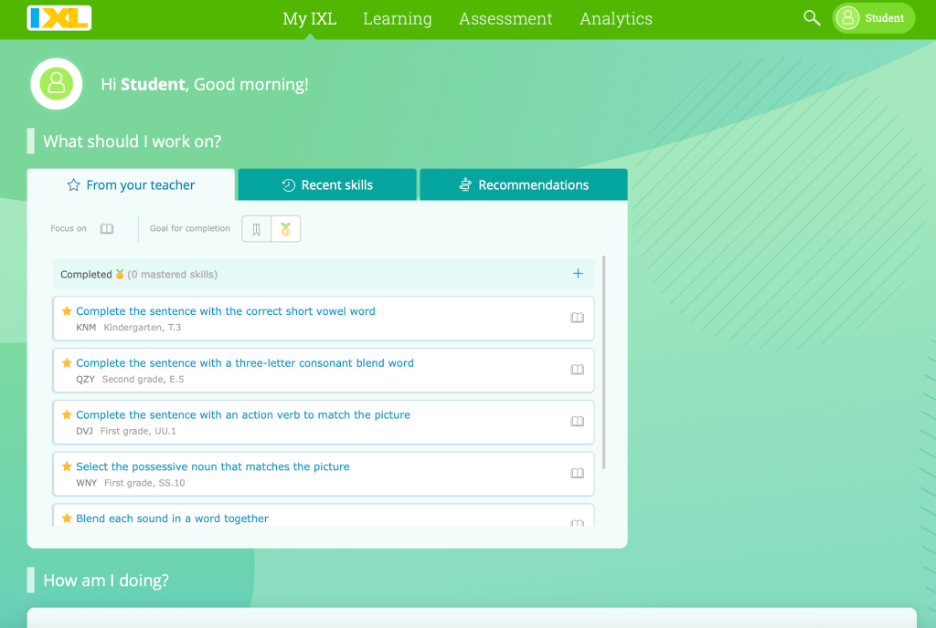
Visual instruction on using IXL diagnostic arena with an internet browser
This is the welcoming screening when you first log in through a web browser such as Chrome, Internet Explorer, Safari … Click on “Assessment” tab to get to diagnostic arena
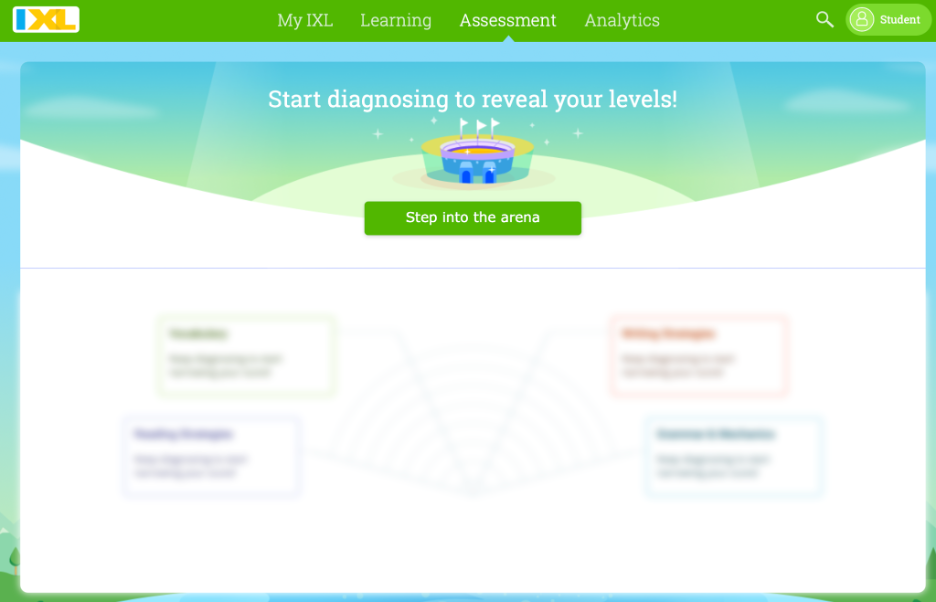
Once you are in assessment tab, click on “Step Into The Arena” to begin your diagnostic testing
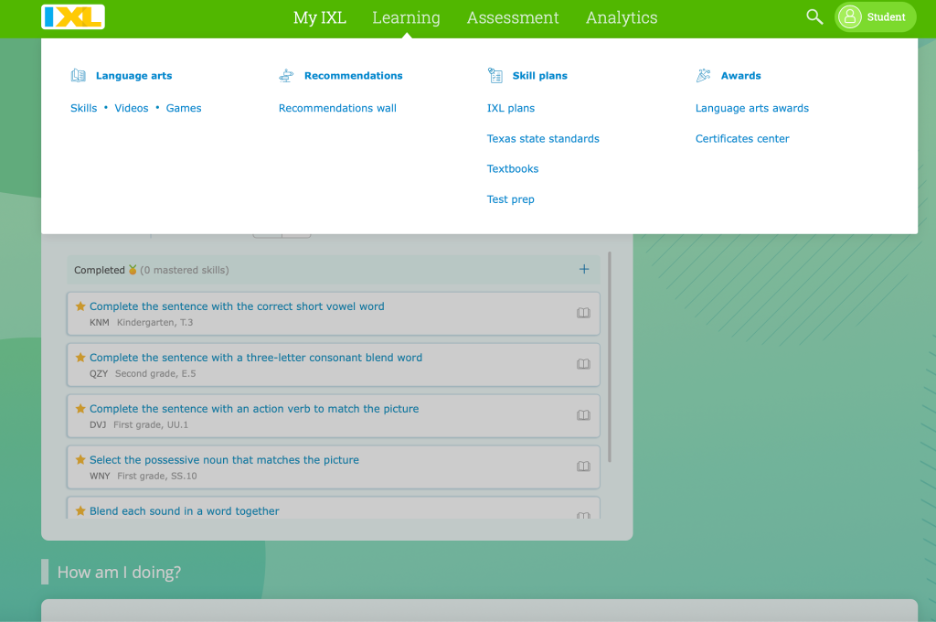
After completion of the diagnostic test, you can go to the Learning tab to get to “recommendation wall” to view all the recommended skills.
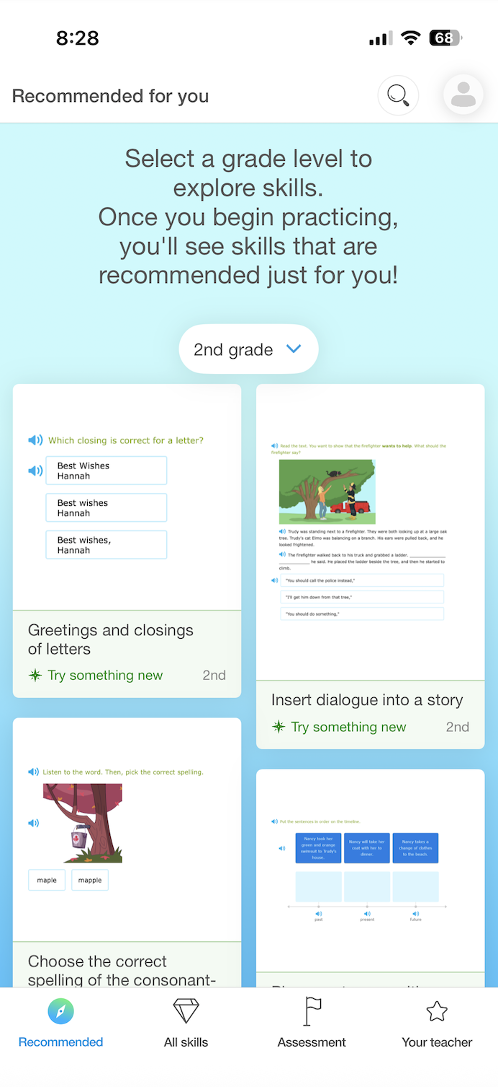
Visual instruction on using IXL diagnostic areana with mobile app (phone, tablet …)
This is the welcoming screen which has all the recommended skills. Click on “Assessment” to get to Diagnostic Arena, then select “Enter Your Diagnostic Arena”